WordPress Incident Response: What to Do Right After a Hack (2025)
Introduction: What to Do If Your WordPress Site Is Hacked
It’s very upsetting to find out that your website, which is like a home away from home, has been hacked. People have said that it’s like going into your store one morning to find the locks broken, the shelves moved around, and writing on the walls.
It happened to a trip blogger I helped beforehand. When she woke up, she had hundreds of emails from people saying that her blog was linking to a sketchy gaming site. Within hours, her ad income and SEO rankings dropped drastically, and she was scared that she would lose years of hard work.
And she’s not the only one! There are others like her too. In 2025, WordPress still powers 43% of the web. This makes it the most popular site for hackers to break into. There are many ways hackers try to get in, including brute-force attacks, sneaky PHP backdoors, and attacks that use AI to look for holes in the internet that haven’t been fixed yet.
But it’s not the end of the game if you get hacked. What matters is how you act in those first hours. Being quick and smart will help you get back on track, keep your audience safe, and make your site better than ever.
This guide is your step-by-step plan for responding to incidents. It’s written in simple English, has lots of real-life examples, and has been updated for 2025. This will help you not only survive a hack, but also come back better, whether you’re a new blogger or run multiple sites for clients.
Step 1: Don’t Panic — Breathe First
Why this matters: This is important because staying calm helps you avoid making mistakes that make recovery harder.
What’s the worst mistake I see? Delete everything out of fear. When a freelancer I worked with saw some strange code in his WordPress files, he wiped the whole site, along with all of his backups. It took weeks to rebuild what should have only taken two hours to clean up.
Do this instead:
- Take a deep breath.
- Remember: most hacks can be fixed.
- Commit to following the steps carefully.
What do you do when your car breaks down? You don’t throw it away; you figure out what’s wrong. Similar way of thinking here.
Step 2: Confirm the Hack
Why this is important: Your site isn’t always hacked when it acts “weird.”
What seems like a hack is sometimes just a plugin clash, a broken theme, or a server setting that isn’t right. Make sure the problem is real before you go into full incident mode.
How to tell if your site has been hacked
- Directs to sites about gaming, drugs, or adult content.
- You have some strange new users in your WordPress admin.
- Google Search Console shows alerts like “Malware detected.”
- PHP or JS files in /uploads/ that look sketchy.
- Boosts in speed that don’t make sense (often caused by bots).
- Japanese term spam in Google’s search results, also known as the “Japanese keyword hack.”
Tools to verify
- Sucuri SiteCheck (2025 update): Free external malware checker
- Wordfence Security (2025): better scanner for backdoors and code that has been hidden.
- If Google finds malware, it will show up in the Google Search Console > Security Issues.
When I cleaned up a site in 2024, Google all of a sudden started showing Japanese names, even though the front end looked fine. It is Cloaking malware that changed the site so that Google saw a different version than people did.
Step 3: Set the site to “maintenance mode.”
Why this matters: This is important because you don’t want people or search engines to see the version that has been hacked.
It’s best to briefly shut down your site if it’s showing spammy content or redirecting people to other sites. This keeps your brand’s image safe while you work to fix it.
How to do it
- Install a known maintenance plugin like SeedProd Coming Soon if you are still an administrator.
- If you are unable to access WP Admin:
- Go to your hosting control panel.
- Put a simple “We’re under maintenance” message in index.html.
- Change the name of the WordPress index.php file for now.
👉 Pro tip: If you think the hack came through one of the plugins, don’t add any new ones. The safest thing is an HTML maintenance page that you manually make.
Step 4: Take a backup of everything, even the version that has been hacked.
Why this is important: You need proof to investigate, and having a backup is like having a safety net.
It might seem strange to back up a site that has already been hacked, but it’s important to do so for two reasons:
- You might have to look at the hacked files again later to figure out what happened.
- You can go back if you mess up while cleaning up.
What to back up
- Files: wp-content (themes, plugins, uploads), wp-config.php, .htaccess.
- Database: via phpMyAdmin or your host’s backup tool.
Tools in 2025
- You can use UpdraftPlus with cloud files like Google Drive.
- cPanel Backup Wizard.
- You can download files using FTP or SFTP (manual, but always works).
⚠️ Save it somewhere else, like on your computer or in the cloud, not on the system that was hacked.
Step 5: Get in touch with your hosting company
Why this is important ? Because your host has more tools and logs than you do.
In 2025, good server companies are already taking steps to stop hacks. Some, like Kinsta, let you get rid of malware with just one click. Others, like SiteGround, put infected files in a separate area immediately.
Questions you should ask your host:
- Can they state where the entry point is?
- Are there free malware removal services?
- Can they give you access and problem logs from the server?
If you use cheap shared hosting, be aware that some companies delete accounts that have been hacked right away. You should work with them instead of against them.
Step 6: Check for malware and infections
Why this matters: This is important because you can’t fix something you can’t see.
Tools that operate automatically
- Wordfence (2025): Deep file check, finds PHP backdoors that are hidden.
- Sucuri Scanner: Detects blacklist and spam scripts.
- MalCare Security: You can get rid of malware with just one click.
Manual scanning (for the brave)
- You can use SSH or FTP to connect.
- Look for code that seems fishy:
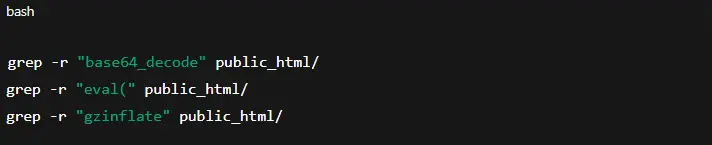
- Keep an eye out for unfamiliar files in /uploads/, /wp-includes/, or /wp-admin/.
Real life Experience: I once looked in uploads and found a “jpg” file that was really a PHP script. Hackers use this to hide information.
Step 7: Change all of your passwords.
Why this is important: Hackers love using stolen passwords to open secret doors.
Reset everything:
- The WordPress admin
- Panel for hosting (cPanel or Plesk)
- FTP and SFTP
- Database (make sure to change wp-config.php)
- Emails that are linked
Turn on 2FA in 2025
- You can use Google Authenticator, Authy, or even 2FA through email.
- Wordfence Login Security (free) makes it easy to set up 2FA.
Step 8: Clean up files and get rid of malware
What this means: If you leave behind even one infected file, your site could get affected again.
Manual process for cleaning up
- Replace WordPress core files: Get a new copy from wordpress.org. Except for wp-config.php and wp-content, change everything else.
- Look at.htaccess here: Look for redirects like

- Get rid of them.
- Look at wp-config.php to make sure the bottom doesn’t have any weird code.
- Scan wp-content/uploads and get rid of any.php files that look fishy.
Cleaning up automatically
- Wordfence Premium → can automatically get rid of malware.
- Sucuri Firewall → cleans & prevents reinfection.
Step 9: Restore using a clean backup.
This is important because it can save time compared to deep cleaning.
Restoring is often the fastest choice if you have a backup that is clean from before the hack.
⚠️ Warning: Do not recover a backup that has viruses on it. Start by running a malware check on it.
💡 Example: A shop owner recovered a backup from last week, but the hack had been there for two weeks already. So, guess what? Reinfection happened right away.
Step 10: Protect WordPress to stop hackers from getting in again.
This is important because recovery doesn’t mean anything if you don’t lock the doors again.
Steps necessary for hardening
- Use a Web Application Firewall (such as Sucuri or Cloudflare).
- Create your own URL for wp-login.php and move it there.
- Turn off editing files in the dashboard:

- Get rid of plugins and themes that you don’t use.
- Get the most recent stable version of PHP (2025, which is PHP 8.3).
Step 11: Look at Google’s blacklist and SEO
Why this is important: Hacks hurt SEO. It’s not enough to just clean up your page.
After cleaning up
- Go to Google Search Console and click on Security Issues.
- Ask for a Review of Security.
- Find spammy pages that have been listed with:

- You can check to see if hackers have made any bad backlinks with Ahrefs or SEMrush.
I helped a writer get her website back up and running in 2024. Despite that, it didn’t get many visitors until we asked Google to look at it again and removed any fake links.
Step 12: Creating an incident response plan
This is important because hack repair is hard, and you don’t want to make the same mistakes again.
Here is an easy template:
- Detection: How do you keep an eye out for hacks? (alerts, uptime tools, security plugins).
- Response team: Who does what? (owner of the site, developer, and hosting).
- Communication: If you need to let users or customers know something, how do you do it?
- Prevention: What changes will you make post-incident?
👉 Store this document somewhere safe.
Lastly, don’t let a hack break you.
You should be more careful after getting hacked. Most of the time, your site is safer after you clean it up.
Don’t forget that you don’t have to do it by yourself. We help companies and bloggers get back into hacked sites, keep them safe, and make sure they work well at Preet Web Vision. You can always get in touch:
Call +63-9633112000 or email hello@preetwebvision.com.
Check out our YouTube channels:
- Preet Tech Ideas (English)
- Preet WebXP (Hindi)
How about you? Have hackers ever gotten into your WordPress site? Tell me about the first thing you did and what you wish you knew then. Feel free to leave your ideas, questions, or war stories in the comment section. Your story could help another writer who is feeling stressed.